
FFL Finder1.02 - Google Play
You'll be able to see results in few seconds.
Publisher Description
** New lower price, now $.99! - Limited Time Fall Hunting Sale **
FFL Finder is an indispensable app that helps hunters and shooters locate Federal Firearms License holders - our source of not only firearms purchases, but parts, repairs, ammunition, hunting and shooting gear and related accessories.
Imagine you are traveling and your firearm is lost, optics damaged, need ammunition, need repairs - and you need them NOW!
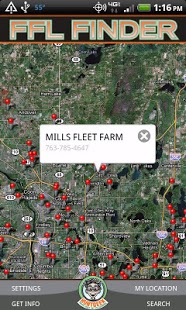
With FFL Finder, you simply open the app and instantly get mapped results of FFL holders near your location (via GPS) or by selecting an area on a map.
FFL Finder Features:
• Filter searches by up to 9 different FFL types
• Search listings using partial names (like those containing certain phrases)
• 2 ways to search: By your current location, or by centering the FFL Finder map on any location in the US.
• Adjustable radius of distance for results
• Dial phone of target listing from within FFL Finder app
NOTE: This app requires an internet or Wi-Fi enabled connection in order to retrieve current data for display/mapping.
--
Quick Start Instructions:
Open the app on your device.
The main screen appears with a "world view map".
At bottom right, click "My Location". The map should center on your current location, and provide a blue "beacon" for where you are, currently.
Next, click "Search" at bottom right.
You can search using a name, if you would like. Or, leave blank and adjust your search radius. 20 miles is default.
Click "Show Results" and red pins will drop showing you the locations of FFL Holders within your search radius.
Click a pin on the map for a quick view of their name and phone number.
Click the blue arrow at the right of the info box to view full name, address, and location information.
You can also adjust your "Settings" on the bottom left of the screen, in the Hunt Geek menu bar.
This allows for searching/filtering of the different FFL Types.
You can also search for FFL holders by "map center". Why and how, you might ask?
For instance, you might need equipment for a trip that is near SLC, Utah.
To locate FFL holders in Salt Lake City, Utah, you'd simply pinch and zoom the map to that city.
Then, click "search" and then "Show results". The results will be centered around what you see on the map.
This enables you to search for FFL holders in areas where you might not know the zip code, but you do know the location or general area.
Disclaimer: Although information is believed to be accurate, and updated frequently, please double-check information before traveling. Map points are approximations and actual addresses should be referred to for best accuracy. Hunt Geek, Inc. assumes no responsibility for misuse of this app or the information contained within.
About FFL Finder
The company that develops FFL Finder is Hunt Geek. The latest version released by its developer is 1.02.
To install FFL Finder on your Android device, just click the green Continue To App button above to start the installation process. The app is listed on our website since 2011-04-12 and was downloaded 0 times. We have already checked if the download link is safe, however for your own protection we recommend that you scan the downloaded app with your antivirus. Your antivirus may detect the FFL Finder as malware as malware if the download link to com.huntgeek.ffl is broken.
How to install FFL Finder on your Android device:
- Click on the Continue To App button on our website. This will redirect you to Google Play.
- Once the FFL Finder is shown in the Google Play listing of your Android device, you can start its download and installation. Tap on the Install button located below the search bar and to the right of the app icon.
- A pop-up window with the permissions required by FFL Finder will be shown. Click on Accept to continue the process.
- FFL Finder will be downloaded onto your device, displaying a progress. Once the download completes, the installation will start and you'll get a notification after the installation is finished.
Program Details
System requirements
Download information
Pricing
Version History
version 1.02
posted on 2011-04-12
Several fixes and updates
version 1.02
posted on 2011-04-12
Disclaimer
Official Google Play Link
We do not host FFL Finder on our servers. We did not scan it for viruses, adware, spyware or other type of malware. This app is hosted by Google and passed their terms and conditions to be listed there. We recommend caution when installing it.
The Google Play link for FFL Finder is provided to you by apps112.com without any warranties, representations or guarantees of any kind, so access it at your own risk.
If you have questions regarding this particular app contact the publisher directly. For questions about the functionalities of apps112.com contact us.
